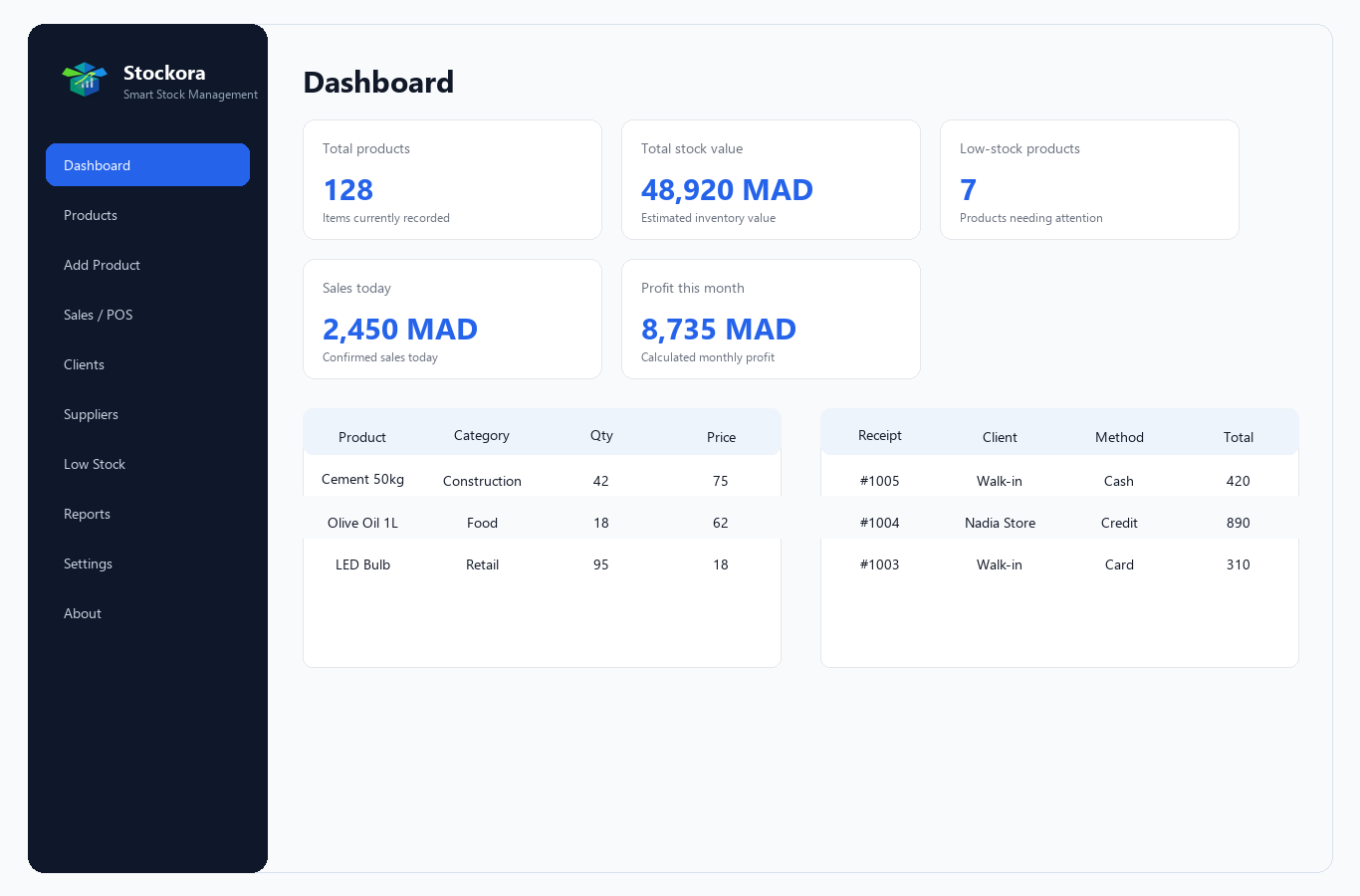
أضف المنتجات مع الأسعار، الكميات، الباركود، المورد، والموقع داخل المخزن.
لماذا Stockora؟
المشكلة التي يحلها Stockora
أصحاب المحلات الصغيرة والمتوسطة يحتاجون إلى طريقة بسيطة لتنظيم المنتجات، تتبع الكميات، تسجيل المبيعات، معرفة المخزون المنخفض، ومتابعة العملاء والموردين بدون الحاجة إلى اتصال دائم بالإنترنت أو اشتراكات شهرية.
الحل
حل عملي للمحلات الصغيرة والمتوسطة
سجل عمليات البيع ونقاط البيع مع تحديث المخزون تلقائياً بعد كل عملية.
احفظ بيانات العملاء والموردين وتابع الديون والمدفوعات والعلاقات التجارية.
راقب المبيعات، الأرباح، المخزون الحالي، والمنتجات منخفضة الكمية.
المميزات
كل ما يحتاجه المتجر لإدارة يومية أوضح
يعمل بدون إنترنت
البرنامج يعمل محلياً على جهاز المستخدم ولا يحتاج إلى اتصال دائم.
يدعم 4 لغات
العربية، الفرنسية، الإنجليزية، والإسبانية ضمن ملفات ترجمة محلية.
إدارة المنتجات والمخزون
إضافة وتعديل المنتجات والكميات والأسعار والتنبيهات بسهولة.
نقطة بيع للمبيعات
شاشة مبيعات تساعد على تسجيل الفواتير وتحديث الكميات تلقائياً.
إدارة العملاء
متابعة بيانات العملاء، الديون، المدفوعات، والمبالغ المتبقية.
إدارة الموردين
حفظ بيانات الموردين وربطهم بالمنتجات لتسهيل المتابعة.
تنبيهات انخفاض المخزون
معرفة المنتجات التي وصلت إلى الحد الأدنى قبل نفادها.
تقارير المبيعات والمخزون
تقارير للمبيعات، الأرباح، المخزون، العملاء، والموردين.
قاعدة بيانات محلية SQLite
البيانات محفوظة في قاعدة محلية سهلة النسخ الاحتياطي والنقل.
مناسب لأجهزة Windows
مصمم كتطبيق مكتبي مناسب للاستخدام اليومي على ويندوز.
صور البرنامج
لقطات تعرض واجهات Stockora الأساسية
اللغات
يدعم 4 لغات
العربية تدعم اتجاه RTL للنماذج والجداول، بينما تعمل الفرنسية والإنجليزية والإسبانية باتجاه LTR.
محتوى المنتج
ماذا يتضمن المنتج؟
ملف تشغيل Windows إذا كان موجوداًنسخة تنفيذية لتجربة البرنامج بسرعة عند توفرها داخل الحزمة.
الكود المصدريملفات Python وواجهات PyQt6 والخدمات وقاعدة البيانات.
قاعدة بيانات SQLiteملف قاعدة بيانات محلي مع مخطط الجداول الأساسي.
ملفات التوثيقتعليمات عربية وإنجليزية للتثبيت والاستخدام والترخيص.
صور توضيحيةلقطات شاشة ومرفقات مرئية لعرض واجهات البرنامج.
تعليمات التثبيت والاستخدامشرح تشغيل المستخدم العادي وتشغيل المطورين عبر Python.
المتطلبات
متطلبات تشغيل Stockora
- Windows 10 أو أحدث
- Python 3.10+ للمطورين
- PyQt6
- SQLite
- لا يحتاج إلى إنترنت أثناء الاستخدام
الأسئلة الشائعة
إجابات سريعة قبل الشراء
هل يعمل Stockora بدون إنترنت؟
نعم، يعمل محلياً ويستخدم قاعدة بيانات SQLite.
هل يدعم البرنامج العربية؟
نعم، ويدعم كذلك الفرنسية والإنجليزية والإسبانية.
هل يمكن تعديل الكود؟
نعم، المنتج يتضمن الكود المصدري حسب نوع الترخيص.
هل يناسب المحلات الصغيرة؟
نعم، مناسب للمحلات الصغيرة والمتوسطة.